Guide
What is the easiest embroidery machine to use?
Ease is not about buttons. It is about how a design gets from your computer onto the machine, and how often you have to re-hoop.
Heads up: the buy links on this page are affiliate links. If you buy through one we earn a commission at no extra cost to you. It does not change what we recommend or the order we rank things in - here is how we keep those separate.
The short answer
The Brother SE2000, and the reason is wireless design transfer.
Brother lists it as wireless LAN enabled with Design Database Transfer, a 3.7 in color LCD touchscreen and 193 built-in designs. Wireless removes the USB stick from every design you ever stitch, which is the single step people find most annoying about machine embroidery.
If you do not need it to sew, the PE900 is the same answer in embroidery-only form: same 5 x 7 in field, same wireless, same 3.7 in screen, 650 stitches per minute.
Three things that make a machine easy, and one that does not
1. How the design gets onto the machine
This is the biggest one and it is almost never what reviews focus on. Without wireless, every design means: find the file, put it on a USB stick, walk to the machine, insert the stick, navigate the file browser. With wireless, you send it and it is there.
You will do this hundreds of times. Brother lists wireless on the PE900, SE2000 and NQ3550W. It is absent from the SE600, SE700, SE1900 and PE800.
2. How often you have to re-hoop
Every design larger than the field has to be split and re-aligned by eye. That is the hardest manual skill in machine embroidery and the most common source of a ruined piece.
So a bigger field is an ease-of-use feature, not just a capability one. A 5 x 7 in machine is easier to use than a 4 x 4 in machine for exactly the same design, because the design fits.
3. The screen, but only for editing on the machine
Screen size matters if you position, resize and combine designs at the machine rather than on a computer. Brother publishes 3.2 x 1.8 in for the SE700 and PE800, 3 x 1.6 in for the SE1900, 3.7 in for the PE900 and SE2000, and 10.1 in for the PR680W.
If you prepare everything in software first, this matters much less than the spec sheets imply.
What does not make a machine easier: the design library
Built-in design counts range from 80 on the SE600 to 258 on the NQ3550W, and they are the most heavily marketed specification in the category. Most people stitch designs they downloaded. A large built-in library is a nice extra and it is not an ease-of-use feature.
Ease, ranked by how often the friction happens
Every design: getting the file onto the machine. Wireless fixes this permanently.
Every large design: splitting and re-aligning. Field size fixes this.
Every hooping: clamping delicate fabric without marking it. A magnetic frame such as the Brother SAMF180N fixes this.
Occasionally: editing on the machine. A bigger screen fixes this.
Buy in that order and the machine gets easier in proportion to how often you were being annoyed.
Skip this
Do not buy a 4 x 4 in machine because it looks simpler
It is not simpler. It has the same touchscreen, the same threading path and the same stabilizer decisions as a 5 x 7 in machine. What it has is less field, which means more designs get split, which is the hardest thing you will have to do.
The honest answer about learning curve
The machine is rarely what makes machine embroidery hard. Stabilizer choice, hooping tension and design density are, and none of them is a machine feature - they are the same on every machine on this site.
What a good machine does is remove the mechanical friction so that the part you have to learn is the part worth learning. That is why wireless and field size top this list and the design library does not appear on it.
The picks
The two easiest machines here to live with
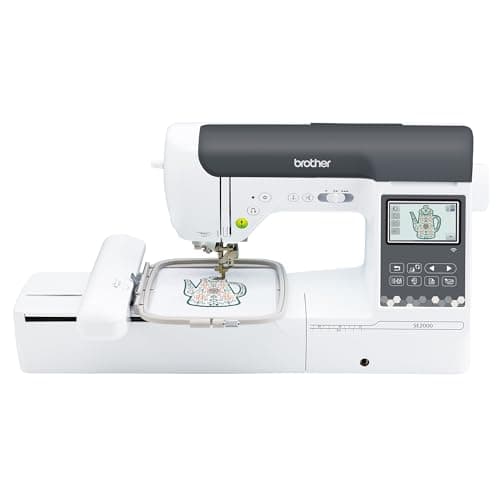
Brother
Brother SE2000
Upper combo tier
The combo machine to buy if you are upgrading rather than starting: 5 x 7 in of field, 241 sewing stitches, a 3.7 in color screen, wireless design transfer, and published speed figures, which most of Brother's range does not have.
Skip it if: You are going to want 6 x 10 in within a year. Buy the field you will need, not the field you need today.
#ad Price as of October 18, 2026, from Amazon. Prices change. How this site is funded.
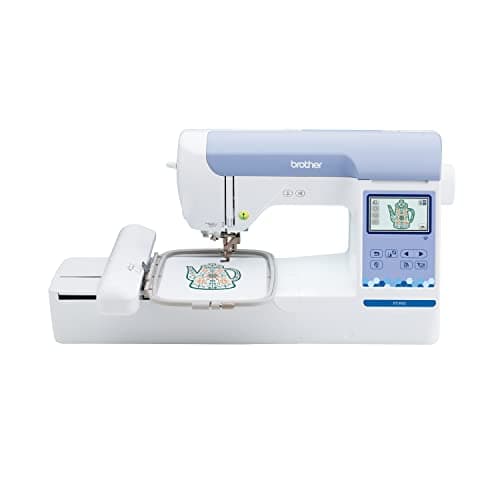
Brother
Brother PE900
Upper embroidery-only tier
The PE800 with the numbers filled in: the same 5 x 7 in field, but Brother publishes 650 spm, 7.4 in from needle to arm, a 3.7 in screen and wireless transfer. What you pay extra for is the workflow, not the field.
Skip it if: You embroider occasionally and the PE800 is meaningfully cheaper. The stitched result is identical.
#ad Price as of October 18, 2026, from Amazon. Prices change. How this site is funded.
How this was ranked
Machines we claim to have tested: none. Everyone in this category says they tested twenty. We have not tested any, and we say so. What we did instead: built the candidate set from what Amazon actually stocks, read the published specification off each manufacturer’s own page, normalized every measurement into the same units and the same order, did the arithmetic on what each step up buys, and left every figure the maker does not publish visibly blank rather than filling it in. Every number on this page links to where it was published, so you can check the work in about five minutes.
- Sponsored placements
- 0
- Free machines accepted
- 0
- Specs linked to a maker page
- All
Questions people actually ask
Frequently asked
What is the easiest embroidery machine to use?
The Brother SE2000. Brother lists it as wireless LAN enabled with a 3.7 in color touchscreen and a 5 x 7 in field. Wireless design transfer removes the USB stick from every project, which is the friction people actually complain about.
Is machine embroidery hard to learn?
The machine is not the hard part. Stabilizer choice, hooping tension and design density are, and those are identical across every machine here. A better machine removes the mechanical friction so you can concentrate on the part that actually needs learning.
Does a bigger touchscreen make a machine easier?
Only if you edit designs on the machine rather than in software first. Brother publishes 3.2 x 1.8 in on the SE700, 3.7 in on the SE2000 and PE900, and 10.1 in on the PR680W. If you prepare designs on a computer, screen size matters much less than wireless transfer does.
Which is easier, an embroidery-only or a combination machine?
Embroidery-only, marginally, because there are fewer modes to switch between and nothing to attach or detach. The Brother PE900 gives you the same 5 x 7 in field and wireless as the SE2000 without the sewing side.
What is the first accessory that makes embroidery easier?
A second hoop, so one piece can stitch while you prepare the next. After that a magnetic frame - Brother’s SAMF180N is a 4 x 7 in magnetic frame listed for the PE800, PE900, SE1900 and SE2000, and it is the fix for hoop burn on toweling and knits.
Sources
Every specification on this page was read from one of these pages on 1 September 2026.
Read next
- The best embroidery machines for monogramming
- Brother SE2000 review
- The best embroidery machines for beginners
- The types of embroidery machines, and which one you need
- Magnetic embroidery hoops
- The best embroidery machines, ranked on the field you actually get
- Brother SE2000 vs SE1900
- What file format does your embroidery machine need?