Guide
What file format does your embroidery machine need?
The format is decided by the machine, not by you. Here is what Brother publishes that its machines will read, the one format that loses your colors, and how the design gets across.
Heads up: the buy links on this page are affiliate links. If you buy through one we earn a commission at no extra cost to you. It does not change what we recommend or the order we rank things in - here is how we keep those separate.
The short answer
Brother home machines read .pes, .dst, .phc and .pen. The one to watch is .dst.
Brother publishes the list: the machine will read .pes, .dst, .phc and .pen files, and Brother warns that using anything else “may cause the embroidery machine to malfunction”. On individual models the accepted set is narrower - one Brother support page for a current machine states that only .pes, .phc and .dst can be used.
The trap: .dst is a commercial format that carries no thread color information at all. Brother says so in its own words, and says the machine will display the design “with our default thread color sequence” instead.
Best for most buyers: stay in the format your machine’s maker uses natively - for Brother that is .pes - and buy designs sold in it.
The part that surprises people: the format is a purchase decision
You do not pick an embroidery file format. The machine picks it, on the day you buy it, and every design you buy afterwards has to be available in that format or be converted into it.
That is not a disaster - the large design marketplaces sell the same design as a bundle of formats, so the practical effect is usually invisible. It becomes visible in two situations: a design sold in only one format, and a design handed to you by someone with a different brand of machine.
How we judged this
Three criteria, and none of them is “which format is technically better”, because that is not a question a buyer gets to answer.
- What does the maker publish that the machine will read? A published list, not a forum claim.
- What does the format lose? Specifically, whether color information survives.
- How does the file get onto the machine? USB stick or over the network - a published spec row on every machine here.
1. What Brother publishes
Brother’s USA support answer on design format types that the machine will read lists four: .pes, .dst, .phc and .pen (the last from Brother’s own iBroidery store). The same page carries four warnings worth knowing before you buy a design:
- Using data other than those saved designs “may cause the embroidery machine to malfunction”.
- File names with special characters may not display. Letters, numbers, dashes and underscores only.
- A .pes file whose stitch count, color count or number of combined patterns exceeds the machine’s limits cannot be displayed - and Brother does not publish the numeric limits on that page.
- Designs must sit in the root directory of the USB drive. A design inside a folder “cannot be retrieved by the machine”.
That last one is the single most common reason a design “does not show up”, and it has nothing to do with the format at all.
2. The .dst problem, in Brother’s own words
DST is the Tajima commercial format, and it is the closest thing machine embroidery has to a universal file. It is also the one that loses something. Brother’s embroidery data precautions page states it directly: since Tajima (.dst) data does not contain specific thread color information, the design is displayed with Brother’s default thread color sequence, and Brother advises you to check the preview and change the colors as desired.
In practice: a 9-color .dst design opens as 9 color stops in whatever order Brother’s defaults supply. The stitches are right. The colors are a guess, and reconstructing the intended ones is manual work you do on the machine’s screen - which is one more argument for a machine with a screen big enough to work on.
Skip this
Do not buy a conversion as a substitute for buying the right format
Converting between formats works, and it is lossy in both directions. Converting to .dst throws the colors away. Converting out of .dst cannot invent them back.
If a design you want is sold in your machine’s native format, buy that one. Conversion is for designs that only exist in one format, not a routine step.
3. How the file gets there: USB stick or over the network
This is the part that is a genuine specification difference between machines, and it is published.
| Machine | Wireless LAN | USB | Field |
|---|---|---|---|
| Brother PE545 | Yes, published | Yes | 4 x 4 in |
| Brother SE700 | Yes, published | Yes | 4 x 4 in |
| Brother PE900 | Yes, published | Yes | 5 x 7 in |
| Brother SE2000 | Not published as a wireless row | Yes | 5 x 7 in |
| Brother PE800 | No | Yes | 5 x 7 in |
| Brother SE600 | No | Yes | 4 x 4 in |
| Brother NQ1700E | Yes, published | Yes | 6 x 10 in |
| Brother PR680W | Yes, published | Yes | 12 x 8 in |
Wireless is a workflow feature, not a capability one. It does not add formats and it does not lift any limit. What it removes is the stick: on a USB-only machine every design edit means saving, unplugging, walking and replugging, and on a wireless machine it does not.
Whether that is worth paying for depends entirely on how often you iterate. Someone stitching one design a week will not notice. Someone adjusting a design, test stitching, adjusting again will notice on the first evening.
The size limit that catches designs after they arrive
A file can be in the right format, transfer perfectly, and still refuse to open. Brother’s support page is explicit that a pattern too large for the field prompts the machine to ask whether to rotate it 90 degrees - and if it does not fit either way, that is the end of it.
The field is the hardware ceiling and no format changes it. Before buying a design, check its stated dimensions against your machine’s published maximum embroidery area, which is listed for every machine on this site in the hoop size chart. Then subtract the margin - what actually fits covers that arithmetic.
What to do before you buy anything
- Find out what format your designs come in. If you already buy designs, open a past purchase and look at what was in the zip.
- Check that the machine reads it natively. For Brother that means .pes first, .dst as the fallback that loses colors.
- Decide whether you want the stick in the loop. Wireless is a row on the spec sheet; it is easy to check and impossible to add later.
- Check the field against your typical design size, because a format problem is fixable and a field problem is not.
Who each pick is for
- Brother PE545 - best for the cheapest published route to wireless design transfer, if a 4 x 4 in field is enough.
- Brother PE900 - best for anyone who wants wireless transfer and a 5 x 7 in field, so the design that arrives also fits.
- Brother PE800 - best for anyone happy to keep a USB stick in the loop and would rather put the difference into field size.
The picks
Pick by how the design gets there, not by the format
Every Brother here reads the same files. What separates them is whether the design arrives over your network or on a stick, and how much field it lands in.
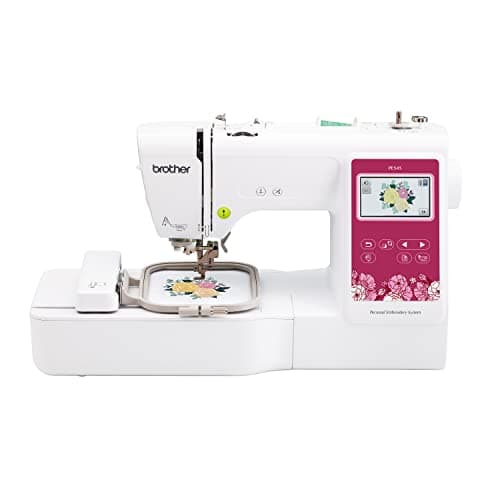
Brother
Brother PE545
Upper entry embroidery-only tier
The only 4 x 4 in Brother that publishes a stitching speed, and the figure is 400 spm - the slowest published embroidery speed on this site. You get wireless transfer and a 3.7 in touchscreen at the 4 x 4 in field size, which is a workflow upgrade rather than a capability one.
Skip it if: You want one machine on the table. The SE700 sews as well as embroiders for a little more, and it carries the same 4 x 4 in field.
#ad Price as of October 18, 2026, from Amazon. Prices change. How this site is funded.
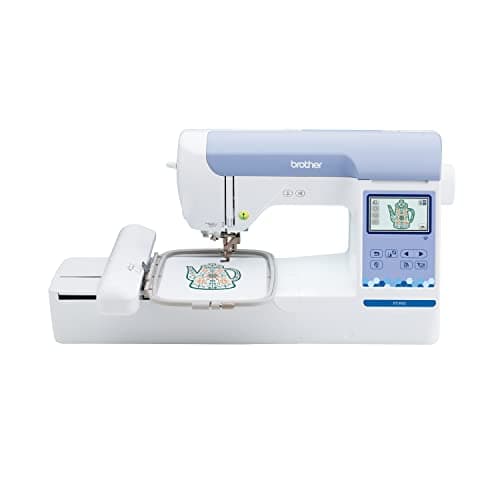
Brother
Brother PE900
Upper embroidery-only tier
The PE800 with the numbers filled in: the same 5 x 7 in field, but Brother publishes 650 spm, 7.4 in from needle to arm, a 3.7 in screen and wireless transfer. What you pay extra for is the workflow, not the field.
Skip it if: You embroider occasionally and the PE800 is meaningfully cheaper. The stitched result is identical.
#ad Price as of October 18, 2026, from Amazon. Prices change. How this site is funded.
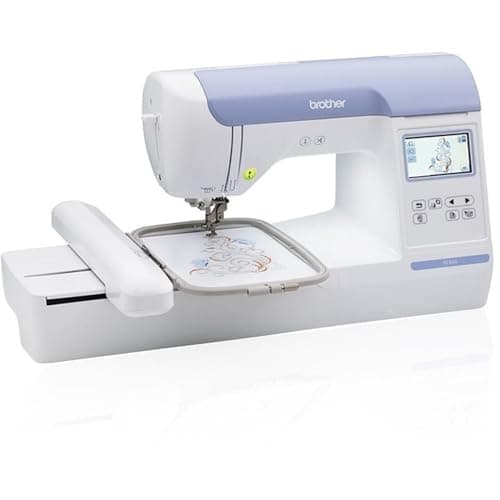
Brother
Brother PE800
Mid embroidery-only tier
5 x 7 in of field with no sewing head to pay for. If you already own a sewing machine you like, this is the cheapest route to a 5 x 7 in hoop.
Skip it if: This would be your only machine. It does not sew: no straight stitch, no seam, no hem.
#ad Price as of October 18, 2026, from Amazon. Prices change. How this site is funded.
How this was ranked
Machines we claim to have tested: none. Everyone in this category says they tested twenty. We have not tested any, and we say so. What we did instead: built the candidate set from what Amazon actually stocks, read the published specification off each manufacturer’s own page, normalized every measurement into the same units and the same order, did the arithmetic on what each step up buys, and left every figure the maker does not publish visibly blank rather than filling it in. Every number on this page links to where it was published, so you can check the work in about five minutes.
- Sponsored placements
- 0
- Free machines accepted
- 0
- Specs linked to a maker page
- All
Questions people actually ask
Frequently asked
What file format does a Brother embroidery machine use?
PES is Brother’s native home-machine format. Brother’s support page lists .pes, .dst, .phc and .pen as the design formats its machines will read, and warns that other data may cause the machine to malfunction. Individual models accept a narrower set - one current machine’s documentation states only .pes, .phc and .dst.
What is a .dst file and will my machine read it?
DST is the Tajima commercial format, and Brother home machines read it. The catch is color: Brother states that Tajima .dst data does not contain specific thread color information, so the machine displays the design using its own default thread color sequence and you set the colors yourself.
Why will my embroidery machine not see the design on my USB stick?
Most often because the file is in a folder. Brother states that designs must be in the USB drive’s root directory and that a design inside a folder cannot be retrieved by the machine. The other common causes are a file name with special characters, and a design that exceeds the machine’s stitch, color or size limits.
Do I need embroidery software to use my machine?
Not to stitch a design you have bought in the right format - the machine reads it directly. You need software to digitize your own artwork, to convert between formats, or to combine and resize designs beyond what the machine’s own screen allows.
Is a wireless embroidery machine worth it?
It is a workflow upgrade, not a capability one. It adds no formats and lifts no limits; it removes the USB stick from the loop. Worth it if you iterate on designs often, hard to justify if you stitch finished purchased designs occasionally.
Can I convert a design to my machine's format?
Yes, with software, and it is lossy. Converting to .dst discards the thread color information permanently, and converting back cannot restore it. Buy the design in your machine’s native format where that option exists.
Sources
Every specification on this page was read from one of these pages on 1 September 2026.
- Brother USA support: design format types that the machine will read (read 17 October 2026)
- Brother support: embroidery data precautions, types of embroidery data that can be used (read 17 October 2026)
- Brother PE545 product page
- Brother PE900 product page
- Brother PE800 product page
- Brother SE700 product page
- Brother SE2000 product page
- Brother NQ1700E product page
- Brother PR680W product page